1.02.2013

Keeping Your Home Organized

Just like weight loss, home organization seems to be a new year resolution staple.  Personally, mine is always to stop biting my nails like a weirdo, and 2013 is gonna be my year I tell you!  A couple years ago I did a presentation on home organization for my women's church group.  I put together a little PowerPoint document for it; and I realized I've never shared it on my blog, so I thought now would be the perfect time! 

I used a combination of inspirational images from various sources, as well as photos from my own home.    


 This is how my office looked before we turned this room into the nursery.  I'm still working on our new office!


12.20.2012

Operation Sandy Hook

I continue to cry every time I read or watch coverage of the Sandy Hook tragedy.  I know everyone wants to reach out to help those parents and family members that lost their little angels in any way that we can.  That's why I was so happy to hear about Operation Sandy Hook.  Small Fry and Brickyard Buffalo have teamed up along with other artists and graphic designers, and are offering a collection of downloadable prints, all at $5 each.  Profits will go to the Sandy Hook School Support Fund through United way.


12.13.2012

How To Design Your Own Holiday Cards

So, this isn't really related to home decor; but I thought I'd share this little tip for fun!  When I'm sending out holiday cards or party invitations I don't like spending lot of money.  And if you pay for a design, envelopes, postage, printing costs - it all adds up quickly!

So to save a little scratch, I like to design my own.  And you really don't need any fancy skills or fancy programs to do it.  I like to use the free online program picmonkey.com.  I am not a paid advertiser for Picmonkey, I just really like the program!  It is fairly new, so everything is free right now; but eventually they will start charging for some of the premium options.

Anyway, it's super easy to use.  Here is how I made my Christmas card this year!

Step One:  Click on "Create a Collage"

Step Two:  Change the pixel size.  This is so when you go to have your photo cards printed, they will be the correct size and will not have to be cropped.  To make 5x7 prints, your pixel size needs to be 2100x1500.
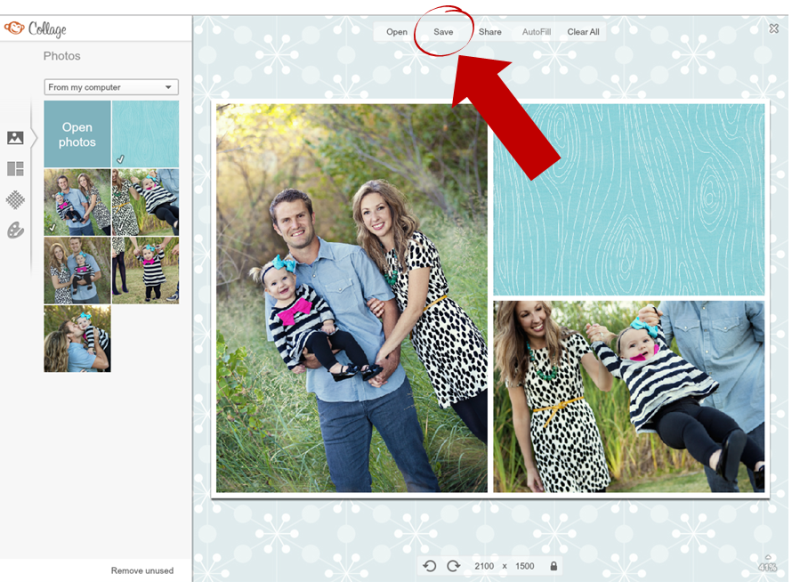
Step Three:  Now that your sizing is correct, add your photos.  I chose several photos so that I could play around with the design and see what I liked best.  You don't have to use every photo that you upload.  Also note here that I uploaded a blue wood grain design background.  I got this by simply googling "Digital Scrapbook Freebies Christmas" and found several free digital scrapbook kits with all kinds of cute background designs.  The blue wood grain design I used is from The Merry Little Christmas Mini Kit from Design House Digital.


Step Four:  Once you have your pictures and background loaded, you need to save your file.  I call this the "base design".  

Step Five:  You save a "base design" because for some reason Picmonkey doesn't let you add any text or symbols to collages, so you have to save the file as a blank design, and then reopen it in Picmonkey as a single photo.  You do this back at the main Picmonkey screen:

Step Six:  Now that your "base design" is open in Picmonkey, you can see it looks the same as the collage screen; but there are different options on the left.  To add text to your design choose the "P" button.  Now have fun adding text and symbols to complete your design!  When you're all finished, save the file to your computer and simply have them printed anywhere that prints photos.  I use Costco.


Picmonkey has all sorts of different fonts and symbols/clipart to choose from and the possibilities are endless.  Here is what my Christmas card looked like when I was finished.  Even if I wasn't trying to save money I'd probably still design my cards this way because I think it is super fun.  I used the same method to make my daughter's birthday card this year.  


Hope this helps some of you, have fun!

12.11.2012

Surprising Finds at Kohl's

Anyone still out there?  I've have zero good excuses for why I haven't been blogging.  Are blogs still cool?  Seems like it's all about Instagram and Facebook these days, and I follow a lot of funny people on Twitter but haven't had the guts to post on it myself yet.  I know you were all dying to know my thoughts on social media so you're welcome!

Let us move on to more important matters, and that is Kohl's.  Good ol' Kohl's; always good for a laugh.  I usually find nothing there but the occasional surprisingly cute shoes.  Well I was pleasantly surprised again the other day when I found a really cute shower curtain for my daughter's bathroom!  It was from the brand Sonoma Life + Style, and when I got online I found several other cute home decor items from the same line.


8.09.2012

The Evolution of an Art Wall

When talking about arranging art and photos on a wall, so many times I hear friends and clients say they haven't hung anything because they're scared they'll do it wrong or that it won't look good. So instead they have blank walls. But the thing is, what's the worst that could happen? You hang something and it looks bad? Then take it down and try something else. Believe me, it's very easy to fill nail holes.

To illustrate my point, I'm going share with you some really ugly wall arrangements (and crappy photos) by yours truly. One wall in my living room has gone through many changes.

This is what I hung up when we first moved in, yikes. Mostly I used items I already had, and then I spray painted a couple of thrift store finds. It's not good.
New Wall 018

Here's what I did next, I decided I needed some bigger pieces.  Better I guess, but still scary.
11_2_09 007

After we bought our sectional, I added to the arrangement.  It stayed like this for awhile, but I wasn't truly satisfied with it.
new sofa 005

And this is how it looks now.  Much better from the original crap fest.  But I'm sure I'll change it again eventually.
DSC00173

DSC00178

7744347708_19268e9367_k

This just shows how it won't kill you to experiment a little. Yeah like me, you might go through some fugly arrangements; but eventually you'll find something that works.

8.08.2012

Making Three Adjoining Rooms Cohesive

My client Katie has a floor plan with three adjoining rooms - her front room, her family/TV room, and her kitchen. We wanted each room to have it's own feel, however they needed to also be cohesive. We did this by using one main color scheme: yellow, blue, green, and gray. However, each room highlights the colors differently.

 The front room is yellow, gray, and blue.  (The quatrefoil pattern seen here represents a plastic room divider that Katie is custom ordering to be placed between her front room and family room.)Katie L. - Front Room

The family room uses mainly blues and greens. Katie L. - Family Room

And the kitchen uses all the colors; but sparingly so as to avoid the three spaces getting too busy. The kitchen also includes a small desk/office area. Katie L. - Kitchen and Desk Area


Out of respect for my client who paid for the room boards, I won't be posting a full source list, but feel free to e-mail me if you have a question about a specific item. Thanks!

6.19.2012

How To Hide Your Computer Cords

Truth bomb: this post will not contain pretty pictures.  My office is still very much in progress, but today I organized my computer cords that have been driving me cray cray.  My husband hates when I say "cray cray".

Here are my ugly cords, bleh.

I bought some of these "Mug Hooks" at Wal-Mart for about 2 bucks.  They are peel and stick.

Then I stuck my hooks along the bottom of my desk like so.  I knew the power pack to my lap top was going to be too heavy for the peel and stick hooks, so I attached two screw-in hooks to hang it on.

Here's how it looked once I strung the cords through, and hung up the power pack.

Ta-da!!  No more cords!